Footnote symbols are special marks used to connect information in a document to an explanation, citation, or additional note. Common examples include the asterisk (*), dagger (†), double dagger (‡), section sign (§), and pilcrow (¶). Superscript numbers such as ¹, ², and ³ are also widely used to identify footnotes in books, research papers, and academic documents.
People search for footnote symbols for different reasons. Some want to copy and paste a symbol into a document, while others need to understand the traditional order of symbols or learn how to insert footnotes in Microsoft Word and Google Docs. The correct choice depends on the type of document, the number of notes, and the style guide being followed.
This guide provides a copy-ready list of footnote symbols, explains their meanings and common uses, demonstrates how to format footnotes, and answers frequently asked questions.
Footnote Symbols Copy and Paste
If you need a footnote symbol quickly, you can copy one from the following lists. These characters can be used in compatible word processors, websites, spreadsheets, and other applications.
Common Footnote Symbols
| Symbol | Name | Common use |
| * | Asterisk | General notes and clarifications |
| † | Dagger | Second note in some traditional systems |
| ‡ | Double dagger | Third note in some traditional systems |
| § | Section sign | References to document sections or specialized notes |
| ‖ | Double vertical line or parallels | Less-common traditional reference mark |
| ¶ | Pilcrow or paragraph mark | Paragraph references and specialized notes |
| # | Number sign | Occasionally used in tables or specialized notation |
| ※ | Reference mark | Used in some publishing traditions, especially East Asian contexts |
The meaning of a symbol depends on the context. For example, the section sign (§) usually identifies a section of a legal document rather than serving as a general footnote marker. Similarly, the number sign (#) has many other uses.
Superscript Numbers for Footnotes
Superscript numbers are among the most common reference marks in modern academic writing. They appear slightly above the normal text line.
Copy and paste:
⁰ ¹ ² ³ ⁴ ⁵ ⁶ ⁷ ⁸ ⁹
Example:
The study included participants from three different regions.¹
¹ Participants were selected according to the study’s eligibility criteria.
In a document with multiple notes, the references might appear as ¹, ², and ³. However, many word processors automatically generate and format footnote numbers, so manually copying these characters is not always necessary.
Repeated Footnote Symbols
Some traditional publishing systems use repeated symbols when several notes are required.
Copy and paste:
** †† ‡‡ §§ ‖‖ ¶¶
For example, an asterisk (*) might identify one note, while a double asterisk (**) identifies another. These conventions are not universal, and repeated symbols may have different meanings in mathematical, scientific, or technical writing.
For ordinary academic documents, automatic numbered footnotes are usually easier to manage.
Footnote Symbols in Order
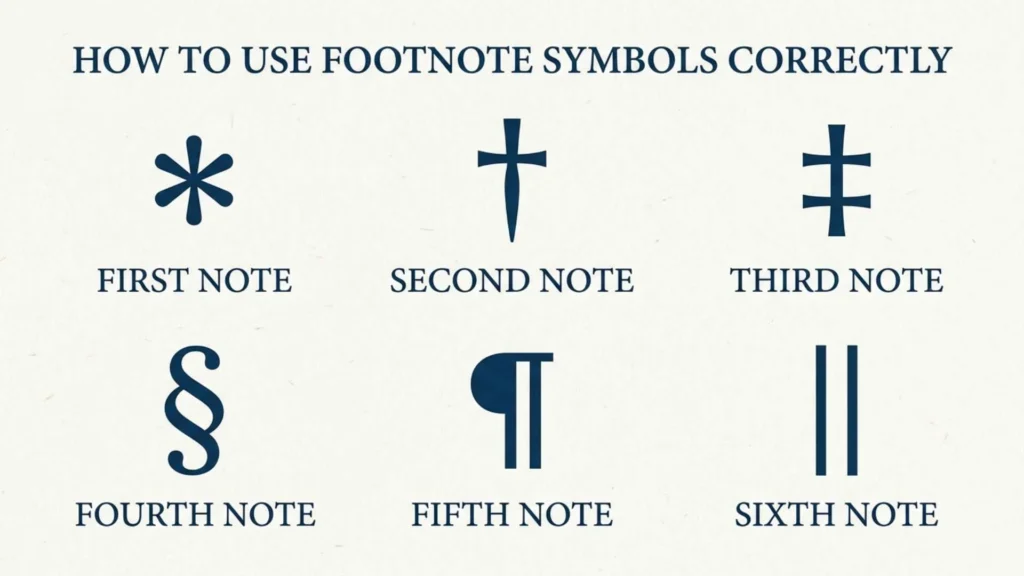
Traditional footnote systems sometimes use a sequence of symbols instead of numbers. One commonly encountered sequence is:
| Position | Symbol | Name |
| First | * | Asterisk |
| Second | † | Dagger |
| Third | ‡ | Double dagger |
| Fourth | § | Section sign |
| Fifth | ‖ | Parallels or double vertical line |
| Sixth | ¶ | Pilcrow |
This is a traditional sequence, not a universal rule. Different publishers and style guides may use different orders, omit some symbols, or choose a number sign (#) at a particular position.
When a page contains several notes, a publisher might use an asterisk for the first note, a dagger for the second, and a double dagger for the third. Another publication may use superscript numbers or lowercase letters instead.
What Happens When All Symbols Are Used?
If a document needs more notes than the chosen symbol system comfortably supports, the writer should follow the publication’s rules for extending the sequence. Some systems repeat marks, while others switch to numbers or use a separate sequence for each table.
Avoid inventing an order without explaining it. Readers should be able to identify each note easily and understand which reference belongs to which explanation.
For academic assignments, follow your instructor’s requirements. For journal articles, books, and professional publications, consult the relevant style guide or publisher’s instructions.
Common Footnote Symbols and Their Meanings
Asterisk (*)
The asterisk is a star-shaped mark and one of the best-known symbols used for notes. It often appears beside a statement, table entry, or name to direct readers to additional information.
Example:
The survey received 250 responses.*
- The total includes responses submitted after the original deadline.
Asterisks also appear in mathematics, programming, statistical analysis, and forms. They may indicate multiplication, a wildcard, statistical significance, or a required field. Therefore, explain their meaning whenever the context could cause confusion.
Dagger (†)
The dagger is a cross-shaped symbol commonly used as a reference mark in traditional footnote systems.
Example:
The collection was donated to the university in 1985.†
† The collection was later transferred to the university’s special archives.
In biographical and historical references, a dagger can also indicate a person’s death. Its meaning should therefore be interpreted according to the surrounding text and publication conventions.
Double Dagger (‡)
The double dagger is a separate symbol with two crossbars. In some traditional footnote sequences, it follows the single dagger.
Example:
The building underwent its first major renovation in 2005.‡
‡ The renovation included changes to the building’s original entrance.
The double dagger is useful when a publication needs several symbol-based notes, but it is less familiar to general readers than superscript numbers.
Section Sign (§)
The section sign identifies a section of a document, particularly in legal writing and formal references.
Example:
The relevant requirements appear in § 8 of the policy.
Although it may appear in traditional symbol lists, the section sign is not primarily a general-purpose footnote marker. Its established role is to direct readers to a particular section.
Pilcrow (¶)
The pilcrow, also called the paragraph mark, identifies a paragraph in editorial, legal, and publishing contexts.
Example:
The exception is explained in paragraph ¶ 4.
The pilcrow is not commonly used for ordinary footnotes in modern academic papers. It is more useful when a publication needs to identify a paragraph or make a specialized reference.
Parallels (‖)
The character ‖ is known as the parallels or double vertical line symbol. Some traditional reference systems include it in their sequence of footnote marks.
However, it also has mathematical and technical meanings. Because it is less familiar as a footnote reference, use it only when the applicable style or publication supports it.
How to Use Footnote Symbols Correctly
Footnote symbols should make additional information easier to find without interrupting the main text. The reference mark in the body of the document must match the mark attached to its corresponding note.
Use Symbols Consistently
Choose a system before formatting your document. Do not switch randomly between asterisks, daggers, and numbers.
For example, if an asterisk identifies a note in a table, use the same symbol beside the corresponding explanation. If the document uses numbered footnotes, continue the numbering according to the selected style.
Keep Footnotes Relevant
A footnote should provide useful information, such as a source citation, a clarification, or an explanation of a technical detail. Avoid adding notes that simply repeat what the main text already says.
If the explanation is essential to understanding your argument, consider including it in the main text instead.
Follow the Required Style Guide
Academic institutions and publishers may have specific requirements for footnote placement, numbering, and content.
Chicago’s notes-and-bibliography system commonly uses numbered notes. MLA generally uses superscript Arabic numerals for footnote and endnote references, while APA permits numbered footnotes for limited explanatory or copyright-related purposes.
Do not assume that all academic styles allow traditional symbols in the main text. The correct format depends on the assignment or publication.
Footnote Symbols in Tables and Charts
Footnote symbols can be particularly helpful in tables because different entries may require separate explanations.
Consider this example:
| Measurement | Group A | Group B |
| Average score | 82* | 76† |
| Participants | 45 | 42 |
The average score is based on the first assessment.
† The average score is based on the second assessment.
The symbols connect the table entries to their corresponding notes. Readers can quickly understand the additional information without needing a long explanation inside each cell.
Some publishers prefer superscript lowercase letters, such as a, b, and c, for table notes. Others use numbers or symbols. Follow the table-formatting rules of the journal, institution, or organization producing the document.
Footnote Symbols vs. Superscript Numbers
Footnote symbols and superscript numbers serve a similar purpose: they connect a passage to additional information. However, they are not equally suitable for every document.
| Feature | Traditional symbols | Superscript numbers |
| Examples | *, †, ‡ | ¹, ², ³ |
| Common applications | Some tables and specialized publications | Academic papers, books, and research |
| Large numbers of notes | May become difficult to track | Usually easier to organize |
| Potential confusion | Some marks have other meanings | Usually easy to recognize |
| Automatic formatting | May require special settings | Widely supported by word processors |
Which should you use?
Use superscript numbers when you need a straightforward system for many notes. Traditional symbols may be appropriate for a table, a short document, or a publication that specifically requires them.
Neither option is automatically correct for every situation. The most reliable choice is the one that meets your style guide’s requirements and helps readers follow the document.
How to Insert Footnote Symbols in Microsoft Word
Microsoft Word includes a built-in footnote feature that automatically places notes and manages their numbering. This is usually preferable to typing symbols manually.
Method 1: Insert an Automatic Footnote
- Open your document in Microsoft Word.
- Place the cursor where you want the footnote reference.
- Open the References tab.
- Select Insert Footnote.
- Enter the note in the footnote area at the bottom of the page.
Word automatically creates a reference and a corresponding footnote. If text is added or removed, it can update the numbering.
Method 2: Change the Footnote Numbering Format
In Word desktop versions that support the relevant settings:
- Open the References tab.
- Find the Footnotes group and open its dialog box using the small dialog launcher.
- Look for the options controlling footnote location and number format.
- Check whether a symbol-based format is available in your version.
- Apply the required setting and confirm the change.
The exact controls can vary between Word versions and platforms. If the required symbol is not available in the numbering options, consult the application’s help documentation before relying on manual formatting.
Method 3: Insert a Symbol Manually
If you only need a character in a sentence or table:
- Place the cursor where the symbol should appear.
- Open Insert and select Symbol or More Symbols, depending on your version.
- Choose the character, such as †, ‡, or §.
- Insert it into the document.
- Apply superscript formatting if required.
A manually inserted character does not automatically link to a note or update when content changes. Use Word’s built-in footnote feature whenever automatic references are needed.
How to Add Footnotes in Google Docs
Google Docs also provides an automatic footnote feature.
- Open your document.
- Place the cursor where the reference should appear.
- Select Insert from the menu.
- Choose Footnote.
- Type your note in the footnote area.
Google Docs inserts and manages the footnote reference for you.
If you need a traditional character such as an asterisk or dagger, you can insert the symbol using the options available in your device or application. However, inserting a character manually is not the same as creating a linked footnote.
For academic documents, automatic footnotes are generally the safer option because they reduce numbering and formatting errors.
Common Mistakes to Avoid
Using an Unexplained Symbol Sequence
Do not assume every reader knows that a dagger or double dagger identifies a particular note. Make sure the corresponding explanation is easy to locate.
Mixing Numbers and Symbols Without a Reason
A document that uses ¹, *, †, and ‡ without a clear system may confuse readers. Use one consistent format unless the publication specifies different systems for separate elements, such as tables and main text.
Forgetting the Corresponding Note
Every reference mark should point to the appropriate explanation. Check that no note is missing and that each symbol matches its intended reference.
Treating Every Symbol as a Footnote Marker
The section sign, pilcrow, asterisk, and other characters have additional uses. Their presence does not automatically mean that a footnote exists.
Ignoring the Publication’s Rules
A symbol sequence that is acceptable in one book or journal may not be suitable for another. Check the required style before submitting academic or professional work.
Frequently Asked Questions About Footnote Symbols
What is the most common footnote symbol?
The asterisk (*) is one of the most recognizable traditional footnote symbols. However, superscript numbers such as ¹ and ² are widely used for footnotes in modern academic writing.
What are the main footnote symbols?
Common examples include the asterisk (*), dagger (†), double dagger (‡), section sign (§), parallels (‖), and pilcrow (¶). Superscript numbers are also commonly used to identify footnotes.
What is the correct order of footnote symbols?
A traditional sequence may begin with *, †, ‡, §, ‖, and ¶. However, the exact sequence varies by publisher and style guide, so it should not be treated as a universal standard.
Can I copy and paste footnote symbols?
Yes. You can copy characters such as *, †, ‡, §, and ¶ from a symbol list and paste them into compatible applications. If you need a linked footnote, use your word processor’s automatic footnote feature instead.
Are footnote symbols and citation symbols the same?
Not exactly. A footnote symbol connects text to a note, while a citation identifies a source or supports a claim. A footnote can contain a citation, but it may also contain an explanation or other supplementary information.
Should footnote symbols appear before or after punctuation?
Placement depends on the style guide and the type of punctuation. In many academic styles, a superscript footnote reference appears after the punctuation at the end of a sentence. Check the relevant guidelines for exceptions.
Can I use an asterisk instead of a footnote number?
Yes, if your style guide or publication permits it. Asterisks are often used for short notes and table explanations, while numbered references are generally easier to manage in longer documents.
How do I type a dagger symbol?
You can copy and paste the dagger character (†), or use your word processor’s symbol-insertion menu. Keyboard shortcuts depend on the operating system, keyboard layout, and application.
Conclusion
Footnote symbols provide a practical way to connect statements, table entries, and other parts of a document to additional explanations or references. Common examples include the asterisk (*), dagger (†), double dagger (‡), section sign (§), and pilcrow (¶). Superscript numbers remain a popular choice for modern academic documents.
If you need a symbol for immediate use, copy it from the reference list near the beginning of this guide. If you are writing a research paper or a lengthy document, consider using automatic footnotes in Word or Google Docs to maintain consistent formatting.
Ultimately, the best footnote system is one that follows the relevant style guide, matches every reference to its note, and helps readers find additional information without disrupting the flow of the text.

I am John Carter, a lifelong enthusiast of language and modern slang. I explore how words evolve and shape culture, and I enjoy uncovering the stories behind everyday expressions. I have authored “Slang and Society: The Language of Youth” and “Modern Words, Modern Worlds”, where I dive into how informal language impacts communication and identity. My goal is to make language accessible, fun, and insightful for everyone who loves words as much as I do.
 Lisa Reynolds
 Marcus Lee